 Unjuiced
Open the Odds Screen when you know the game or prop you want to compare. Its main job is to put available prices next to one another so you can compare the same selection across operators.
Set up your board
- Select the sport, then the market or game-line/prop view you need.
- Check the date and pregame/live context where offered. A live market is not the same quote as its pregame version.
- Select the sportsbooks relevant to you. A hidden book cannot help you compare its price.
- Find the game or player, then read the exact market, side, and line before comparing columns.
- Open the price's available actions for the destination book, more detail, or saving the selection. The actions depend on the market and operator.
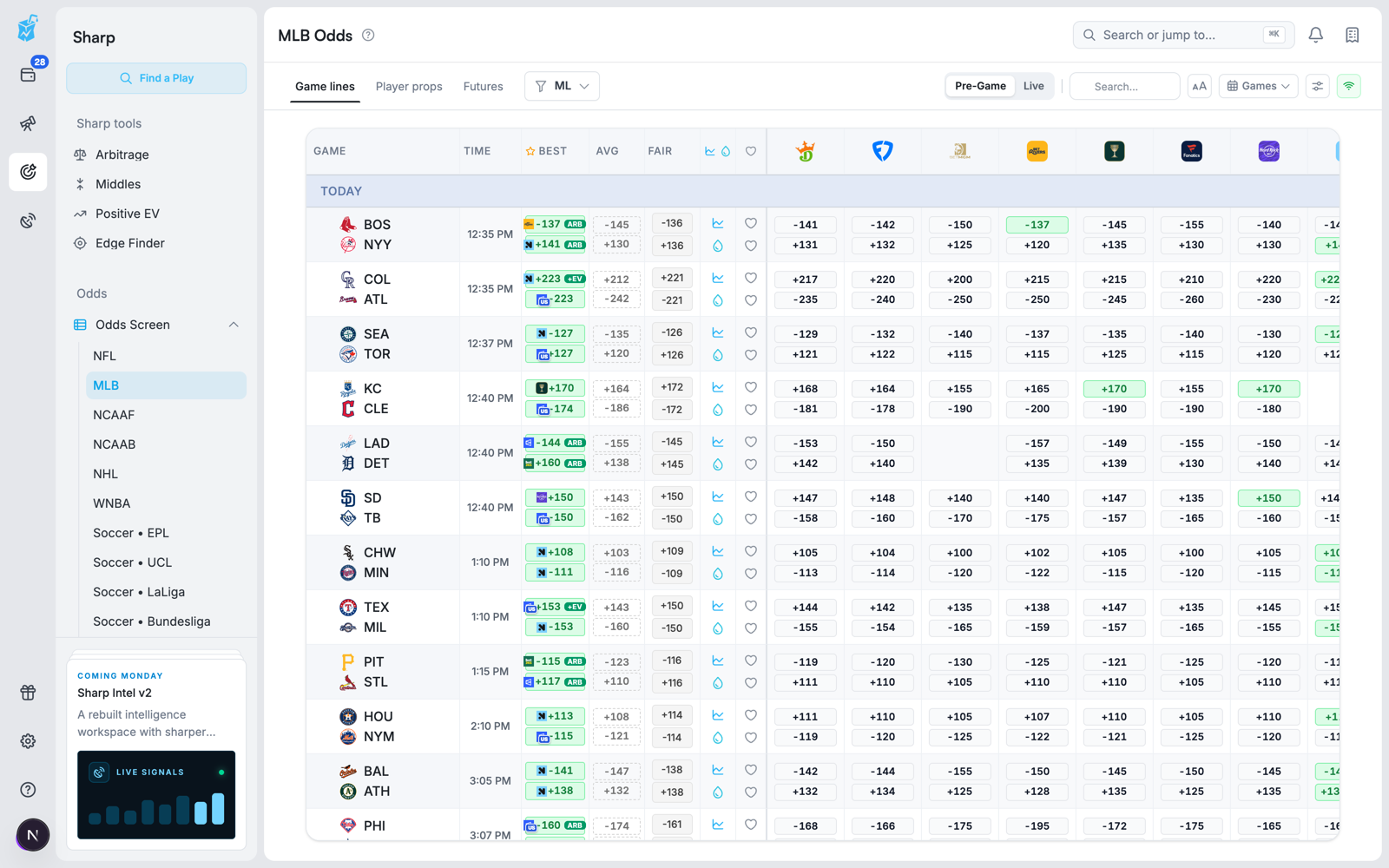
What the columns mean
| Item | How to use it |
|---|---|
| Selection and line | Identify exactly what the price applies to: team/player, side, threshold, and period |
| Sportsbook price | Compare an operator's available quote for that selection |
| Best | Find the best displayed price among the board's comparison set |
| Average | Compare with a market reference; it is not necessarily an executable price |
| Fair, when available | Inspect the no-margin estimate and its reference context; it remains an estimate |
| Missing price | The quote is unavailable for that combination, not zero odds |
Reference columns and badges depend on the selected market and available data. An edge or arbitrage badge is a prompt to inspect the underlying prices and assumptions, not confirmation that an order has been accepted.
A worked comparison
Suppose the same Over 4.5 is -120 at Book A and -105 at Book B. A hypothetical $100 stake would profit about $83.33 at -120 or $95.24 at -105 if it wins. The -105 price is better for that identical bet.
But Over 5.5 at +120 is a different selection. You cannot compare it with Over 4.5 solely by choosing the larger payout. The extra threshold changes which results win.
Use alternates and movement
Where alternate lines are available, open them to compare different thresholds and their prices. Decide which exact threshold you are researching before returning to the cross-book comparison.
Use the available line-history or liquidity controls to investigate movement and available market context. A historical quote explains where a market was; it does not mean that quote can be traded now. Missing history or liquidity should stay unknown rather than being read as no movement or unlimited size.
Save or open a selection
Saving a play or adding it to a slip keeps it for later research. It does not reserve the price or place a wager. At the destination book, confirm the event, period, line, settlement rules, and accepted price. Some deep links can open a general event page rather than a completed slip.
Troubleshooting
- A book column is missing: check your book filters and whether that operator is supported for this market.
- A cell is blank: the book may not offer the selection, the market may be suspended, or no current quote may be available.
- The destination price differs: quotes can move between refresh and click-through. Use the currently offered price for any calculation.
- The board is empty: clear restrictive filters, check sport/date, and try a broadly available game market before a niche prop.
- A mobile column is missing: open the row's detail or price actions; compact layouts show fewer columns at once.
Use Soft Lines to scan for price differences or Hit Rates to research the outcomes behind a prop.