
Open NBA Injury impact. When a starter is ruled out, their minutes and shots go to teammates. Books are often slow to fully adjust those teammates' lines. Injury impact shows, for every player out tonight, which teammates gained the most the last time it happened.
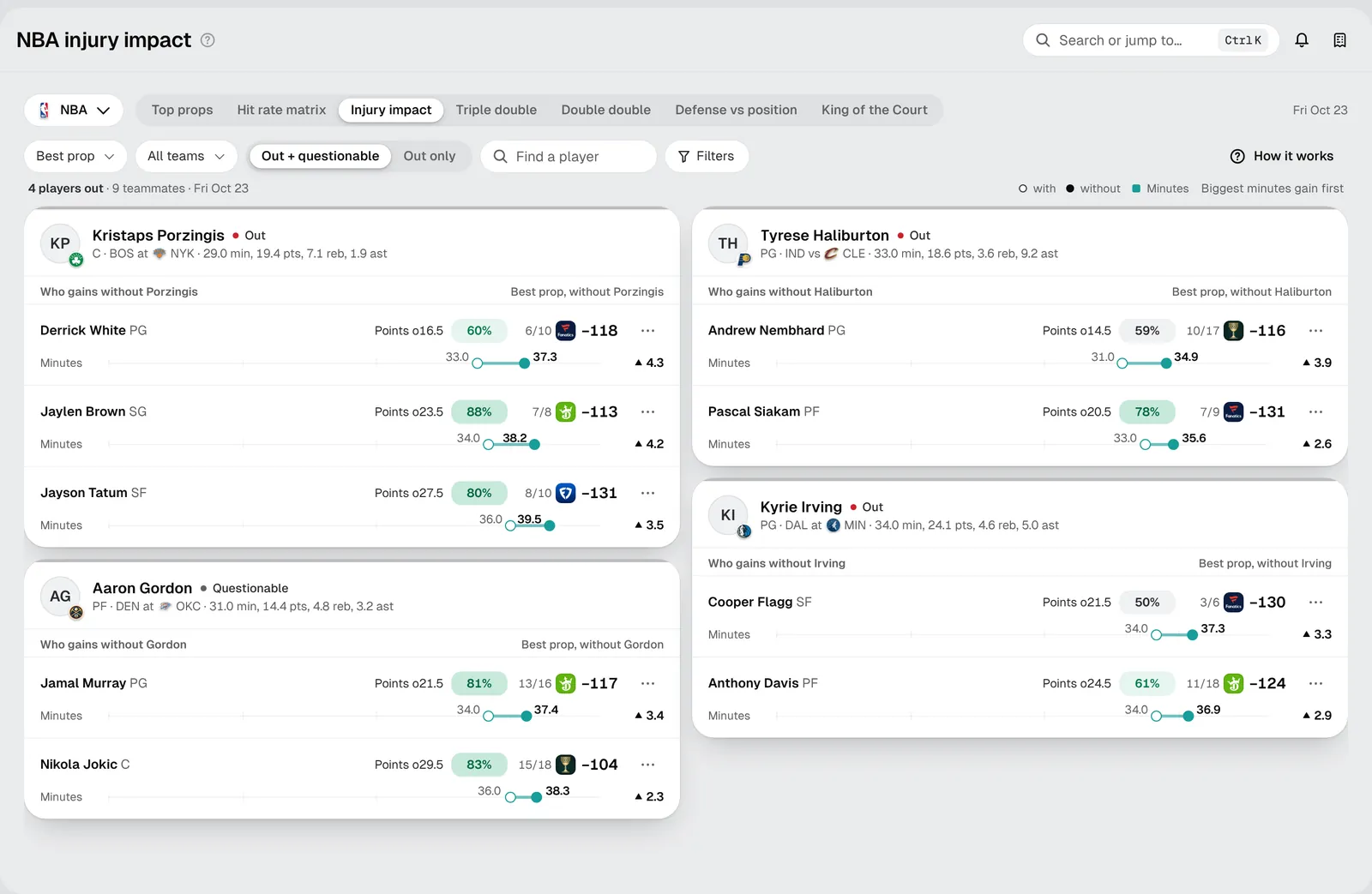
How the sheet is laid out
Every player listed out (or questionable) tonight gets a card. The top of the card shows who it is, their status, tonight's game and their usual minutes, points, rebounds and assists.
Under that is Who gains without that player: the teammates whose minutes went up most in the games the player missed this season, biggest gain first.
Reading a teammate's row
Each teammate's row has two lines.
The prop line shows the teammate's best prop with the player out:
- The prop: for example Points o16.5, over 16.5 points.
- The hit rate: how often that prop went over in games without the player. Green means it hit often.
- The count: 6/10 means it went over in 6 of the 10 games without the player.
- The price: the best price on the board and the book offering it.
The minutes line shows the change. The hollow dot is the teammate's average minutes with the player playing, the solid dot is with the player out, and the number on the right (▲ 4.3) is the difference.
Your first five minutes
- Check the status. Use Out + questionable to see everyone who might sit, or Out only to see only confirmed absences.
- Pick a team. Use All teams to focus on the game you care about.
- Pick a market. Best prop shows each teammate's strongest prop. Switch it to Points, Rebounds, Assists or another market to compare everyone on the same stat.
- Open a teammate. Click a row to open the side panel: their full role with and without the player (minutes, usage, shots and more), their other props, and every game without the player against the line.
- Add it. From the panel you can add the prop to your betslip or track a bet.
Read it carefully
- Count the games. A 3/3 looks perfect but is only three games. Under 5 games the sheet shows a plain gray count with no color for that reason.
- Questionable is a "what if". A questionable player's card shows what happens if they sit. If they play, the card does not apply.
- More minutes is not more money. The minutes bar shows a role change, not an edge. Check that the line hasn't already moved to price it in.
- Who else is out matters. If two starters sit, the teammates' numbers from games when only one sat may not hold. The panel lists other teammates who were out.
Troubleshooting
- No cards: nobody is listed out on tonight's slate yet, or the injury report hasn't posted. Check closer to tip-off.
- A player is missing: only players listed out or questionable get a card. Check the status switch and team filter.
- A teammate has no price: no book is posting that prop right now.